Full Details: Security
- Standard Workstation Diagnostic: Free for life (limited)
- Advanced / Max Workstation Diagnostic: Full Access only 4.99$ / month 30 days trail
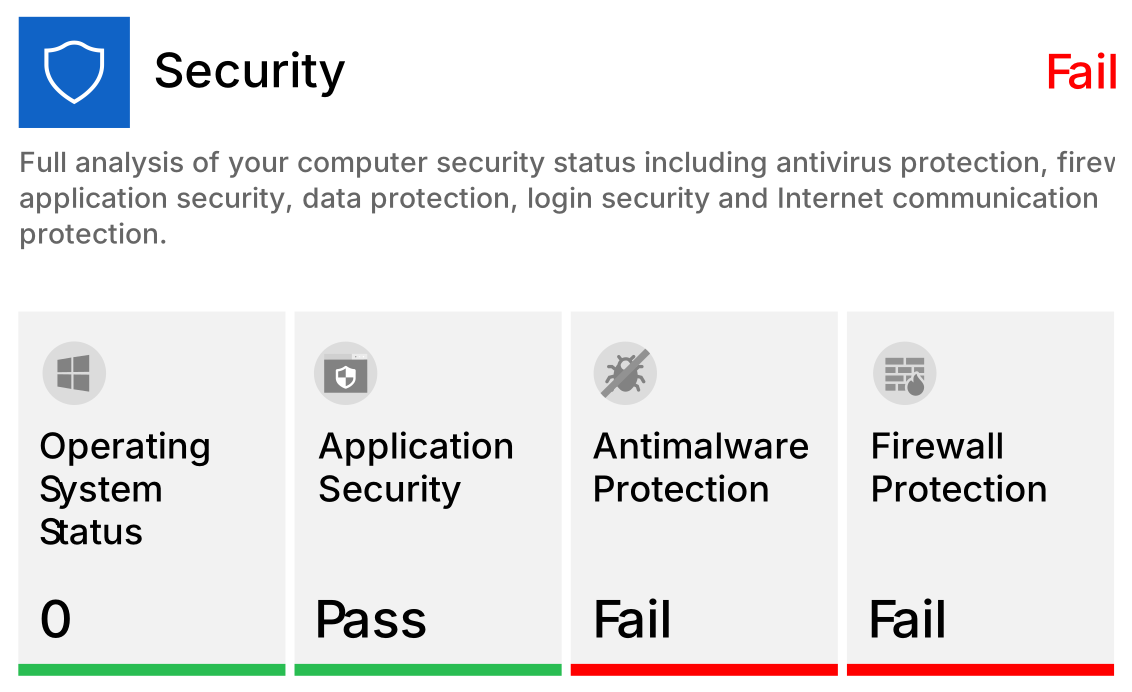
Standard Checking
Workstation Diagnostic Details
Operating System Status (Pass)
Windows version validation and operating system updates checking
Application Security
Applications open to exploitation by targeting weaknesses or software gaps in order to gain unauthorized access or compromise your system.
Antimalware Protection (Fail)
Hardware problems that may affect the normal functioning or stability of your computer.
Firewall Protection
Speed-up the boot time of your system by removing applications that load at startup.
Advanced Checking
Workstation Diagnostic Details
Disable other devices ability to turn on hotspot (ON)
This setting allow another device to turn on mobile hotspot remotely on your device when it connects to the mobile hotspot.
Controlled folder access (OFF)
Controlled folder access helps you protect valuable data from malicious apps and threats, such as ransomware.
Core Isolation (ON)
When these features are enabled, Windows uses hardware virtualization features to create a secure area of system memory that’s isolated from the normal operating system. Windows can run system processes and security software in this secure area. This protects important operating system processes from being tampered with by anything running outside the secure area.
Data Execution Prevention (OFF)
Feature that can help prevent damage to your computer from viruses and other security threats. Harmful programs can try to attack Windows by attempting to run (also known as execute) code from system memory locations reserved for Windows and other authorized programs.
PUA Status (OFF)
The Potentially Unwanted Applications (PUA) protection feature in Windows Defender Antivirus can identify and block PUAs from downloading and installing on endpoints in your network.
Single Administrator Account (ON)
Different user accounts with administrator rights on your computer.
Disable Remote access (ON)
Remote Desktop Protocol (RDP) is a widely adopted protocol for remote administration, but it could dramatically enlarge the attack surface if it isn’t properly managed.
Wi-Fi Sense (ON)
Wi-Fi Sense lets your PC automatically connect to Wi-Fi networks that your friends and acquaintances have previously connected to, even if you don't know the network password.
Windows License (OFF)
Feature that applies glass look to windows borders, heavy to run on older hardware.
Max Checking
Workstation Diagnostic Details
Isolated Browsing Enviroment (ON)
This feature isolates the built-in browser Edge at the hardware level to makes you computer and browsing experience safer.
Ransomware Protection (OFF)
A ransomware is a malware that encrypts all your data and demands a ransom to decrypt it. The Ransomware Protection is a feature that keeps your computer safe against this type of malware.
Ransomware Programs (OFF)
Ransomware is a type of malware from cryptovirology that threatens to publish the victim's data or perpetually block access to it unless a ransom is paid. While some simple ransomware may lock the system in a way which is not difficult for a knowledgeable person to reverse, more advanced malware uses a technique called cryptoviral extortion, in which it encrypts the victim's files, making them inaccessible, and demands a ransom payment to decrypt them.
Remote access settings (ON)
Windows Remote Desktop allows you or others to connect to your computer remotely over a network connection.
Disable SMB Sharing (ON)
SMB is a file sharing protocol. With the SMB sharing turned on your computer is more predisposed to ransomware attacks.
Disable SMBv1 (ON)
To defend yourself against WannaCrypt ransomware it is imperative that you disable SMB1.
Untagged Applications (ON)
Untagged Applications are applications that does not contain the tag of a well known developer.